

How SAP PP Works in Real Life A Practical View of Production Planning
SAP Production Planning manages the complete manufacturing cycle, starting from demand forecasting and ending with finished goods delivery. The overall process connects planning, material management, scheduling, capacity utilization, and shop floor execution. Understanding how SAP PP works in real life helps professionals ensure that products are manufactured on time with optimal use of resources.
Below is a clear explanation of the end-to-end processing flow in SAP PP.
Table of Contents
-
Quick Overview of SAP PP
-
Key Components of Production Planning
-
Demand Management
-
Material Requirement Planning (MRP)
-
Master Data Preparation
-
-
Production Execution Steps
-
Conversion of Planned Orders
-
Production Order Processing
-
Capacity Planning
-
Material Staging
-
Shop Floor Production Execution
-
Confirmation of Operations
-
Goods Receipt and Order Settlement
-
-
Best Practices and Tools
-
FAQs
-
Conclusion
Overview of SAP PP
SAP PP is an important module in the SAP suite, responsible for managing production right from forecasting demand to delivering finished goods. Enterprises utilize SAP PP to connect the processes of production for minimized resource waste and enhanced workflow efficiencies. In such a context, it becomes very relevant to understand how SAP PP works in real life to plan, schedule, and execute productions without causing any bottlenecks or delays. For structured SAP learning, explore FutureLabs Technology to obtain practical experience in real project conditions.
Key Components of Production Planning
Demand Management
The process begins by first identifying the production needs, which is a critical step in understanding how SAP PP works in real life. Initially, companies create Planned Independent Requirements (PIR), and then they consider open sales orders to align production with actual demand. Additionally, forecasting future demand helps ensure that resources are allocated efficiently. Consequently, demand management guarantees that planning is accurate and that the system is fully prepared for subsequent MRP runs. For further reference, see the official SAP Production Planning guide.
Although some of these considerations may not seem fully convincing at first, this is often due to the complex nature of production material, rather than any shortcomings in the methodology itself.
Material Requirement Planning (MRP)
MRP calculates material requirements and timing:
Checks stock, reservations, and pending demands
Generates procurement proposals—planned orders and purchase requisitions
MRP ensures material availability at exactly the time needed, thereby minimizing production delays.

Master Data Preparation
Accurate master data is the basis of SAP PP:
Material Master for product information
Bill of Materials for Components (BOM)
Work centers for machines or labor
Routing for step-by-step operations
Proper master data improves planning accuracy and execution efficiency.
Production Execution Steps
Conversion of Planned Orders
Planned orders from MRP are first converted into:
Production Orders for In-House Manufacturing
Meanwhile, Purchase Orders for external procurement
This step, therefore, confirms the production route for each product.
Production Order Processing
A production order contains:
Firstly, Component allocation
Next, Operation sequence and scheduling
Additionally, Cost tracking and material staging
As a result, it allows production to start by considering resources that are already available.
Capacity Planning
This ensures that machines and workers are not overloaded:
First, Checks work center capacities
Then, Adjusts scheduling and line balancing
Consequently, Capacity planning prevents bottlenecks and keeps the production flowing smoothly.
Material Staging
Before the commencement of production, materials are transferred from storage to the production area. SAP PP caters for automatic or manual posting of goods issues to maintain continuous operations.
Shop Floor Production Execution
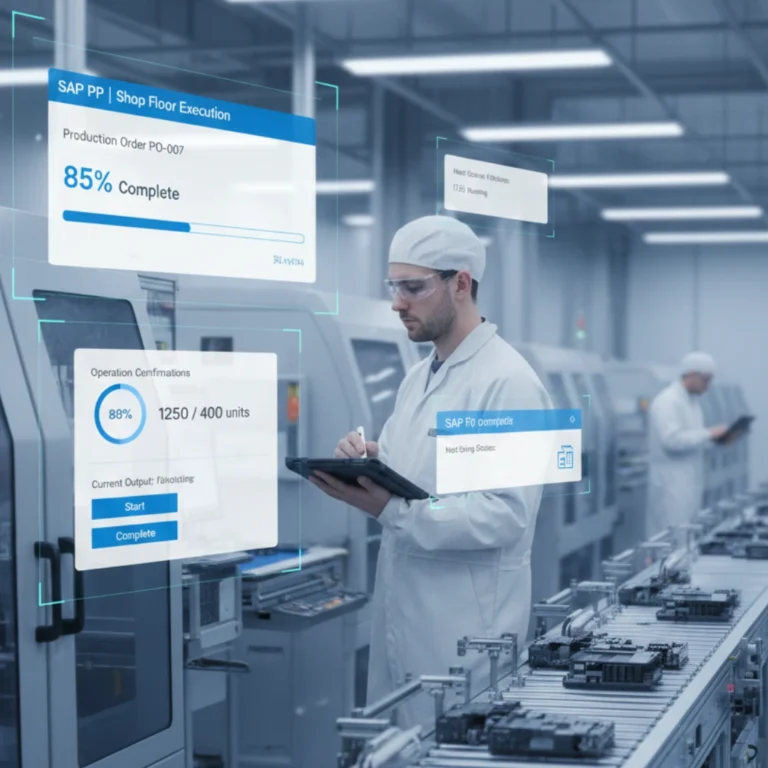
During production, workers first follow the routing steps and then proceed to perform machine operations. Simultaneously, they post partial confirmations wherever required. Meanwhile, SAP immediately records all activities in real time, which not only ensures accurate data capture but also provides managers with a clear overview of production progress. Additionally, by continuously updating operation statuses, the system helps identify potential delays early, thereby allowing supervisors to make timely adjustments. Consequently, production efficiency improves significantly, and resources are utilized optimally. Furthermore, real-time tracking supports better decision-making, while managers can seamlessly monitor workflow performance and ensure that operations remain on schedule. In summary, this integrated approach enables both operational accuracy and proactive management, ultimately enhancing overall productivity.
Confirmation of Operations
Operation confirmations update:
-
Production progress
-
Labor and machine time
-
Quantity of yield and scrap
These updates contribute to accurate tracking of production status.
Goods Receipt and Order Settlement
Once manufacturing is complete:
-
Finished goods are posted to inventory
-
Production orders are updated
-
Costs are settled by comparing actual versus planned costs
Goods receipt and order settlement mark the completion of the production cycle.
Best Practices and Tools
To maximize SAP PP efficiency:
-
Use accurate master data and BOM
-
Run regular MRP simulations
-
Monitor shop floor execution in real time
-
Leverage analytics tools such as SAP BW/4HANA
Structured SAP training with sandbox practice, real datasets, and guided projects is of the essence. To learn more about hands-on training, visit FutureLabs Technology.
Conclusion
Professionals in production planning and manufacturing management, therefore, cannot deliver at their best without a proper understanding of how SAP PP works in an operational environment. By first gaining knowledge of demand management and then mastering MRP, capacity planning, and shop floor execution, they can significantly improve efficiency, while simultaneously reducing costs and building valuable enterprise-ready skills. Moreover, SAP hands-on training, combined with exposure to real projects—such as those provided by FutureLabs Technology—ensures that professionals are fully equipped and can confidently rise to any real-world challenge. In addition, all advanced references and detailed insights are available in the official Production Planning documentation, further supporting continuous learning and practical application.
FAQ’s
Q1: What is the main purpose of SAP PP?
SAP PP manages a complete production process, including planning and execution up to delivery, with optimum utilization of resources.
Q2: In what way does MRP improve production efficiency?
MRP calculates the exact quantity of material and time needed, which thus minimizes lateness, making it easier to adhere to the production schedule.
Q3: Can beginners learn SAP PP without prior experience?
Yes, through practical exercises, tutorials, and sandbox access, structured SAP training programs will help beginners understand the module.
Q4: Which industries use SAP PP?
It increases efficiency in operations for industries such as manufacturing, automobiles, retail, pharmaceuticals, and FMCG.
Q5: Is SAP PP integrated with other SAP modules?
Yes, SAP PP integrates with SAP MM, SD, FICO, and HCM to ensure a smooth workflow across finance, procurement, sales, and HR.
Excellent breakdown, I like it, nice article. I completely agree with the challenges you described. For our projects we started using Listandsell.us and experts for our service, Americas top classified growing site, well can i ask zou a question regarding zour article?